Wrap Up
Technical SEO may seem intimidating to newcomers, but that doesn’t make it any less important.
The right tools can help take some of the guesswork out of the equation.
Technical SEO makes a site understandable and usable for search engines and visitors through crawlable pages, stable URLs, fast delivery, internal paths, and error handling. It works best when technical checks support a page that answers the searcher's task.
SEO strategies cannot be sustained without a consistent foundation. Even if you create amazing content and build a qualified link network, Google will not keep your site at the top if it takes too long to load or has too many pages with errors.
We’re referring to the structural issues of a website, which pertain to technical SEO.
If you envision optimization as a pyramid, technical SEO serves as the foundation that supports content production, link-building, and authority-building strategies.
Therefore, technical problems must be avoided and addressed promptly, or your pyramid may crumble.
In this article, we will explain:
By now, you must have realized that Google likes organized sites, right?
The organization makes the bot’s task easier, as it can understand the pages and learn where to follow its scan.
The structured data, then, helps in this task. Its function is to make markings within the page codes to guide the searcher on certain aspects of its content. Basically, they help to describe your site to the algorithm.
These markups can be used not only for tracking and indexing but also for displaying search results.
One of the main uses of structured data in technical SEO is rich snippets. If you’ve already searched for a recipe on Google, you’ve come across them.
See this example:

The information about evaluations, comments, and preparation time are structured data markups. This type of marking can also appear in other types of content, such as films, local businesses, and products.
In addition to helping Google understand its content, they also convey richer information to users, who have more grounds to decide which link to click on.
But structured data is not just about rich snippets. Another widely used example is the breadcrumbs, which present the path taken by the user (categories and subcategories) to reach that page. You can also use this information in the search results.
You could also use them simply to help Google understand what a certain area of the page is about.
For example, you can insert contact information on the page, which will become clear to your visitor. However, the bot will have to make an effort to understand what that section is about.
To make its task easier, you can create a markup informing this. In the code, this markup would look more or less like this:
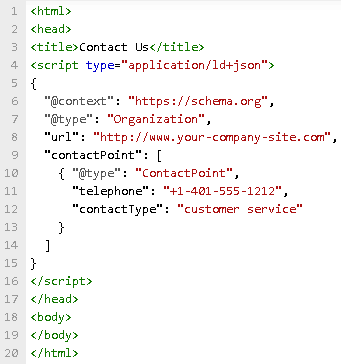
To make these markups, you may need a little more knowledge in coding. But some WordPress plugins facilitate this process, like Schema App Structured Data.
Google also wants to help developers create efficient, structured data (and prevent them from practicing black hat with this resource). That’s why it has created the Structured Data Markup Helper, which also assists in inserting them in your website.
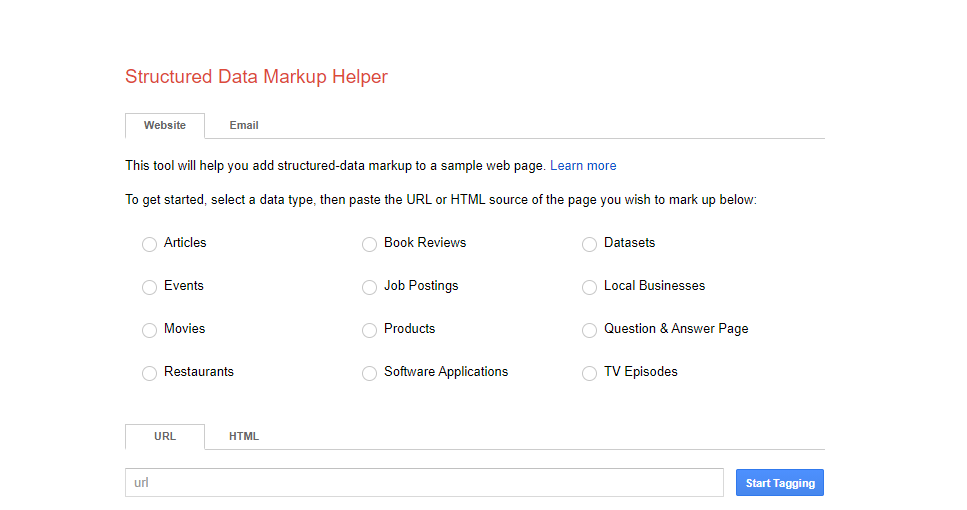
You can also use the Structured Data Testing Tool to test if everything went as planned with your markups. The report shows how Google is scanning your pages and if there are any problems reading the data.
In the site architecture topic, we discussed creating sitemaps to guide Google within its link structure. Now, let’s detail a little more about this feature, which is essential in technical SEO strategies.
The sitemap is a file (usually in XML format) that contains all the pages and documents of a site, as well as the connections between them.
When you present this file to Googlebot, it identifies which pages it should crawl and which are the most important.
The sitemap is even more important for sites that are very large or have isolated pages. Thus, the file ensures that all of them are crawled and indexed by the robot.
There are different ways to send the sitemap file to Google. The simplest way is via Google Search Console, which has a specific sitemap reporting tool.
But with some more advanced knowledge, you can specify the file path within robots.txt or use the “ping” function to request the sitemap tracking.
In , Google explains how you can do all this.
There is nothing more frustrating than doing a Google search, finding exactly the result you wanted, but facing a 404 error that prevents you from viewing the content.
You must have been there and know how it feels. Google also knows that this is a problem for the user experience and usually penalizes the pages that frequently present this error.
Error 404 is a site response to a user request. When it appears, it means that the user requested an address, and the site was able to communicate with the server but did not find the requested address.
This can happen when a page has its URL changed, and the user tries to access the old URL. To prevent them from encountering a 404 Error, sites can redirect visitors to the correct URL by applying 301 redirections.
However, these errors can happen even if all URLs are correct. When the URL has a typing error, for example, Error 404 may appear. In this case, to prevent the user from leaving the site, you can create a custom error page, suggesting other paths to the visitor.
There are also SEO tools that identify pages with errors that you can correct. Dead Link Checker, Screaming Frog, and Google Search Console itself can help in this task.
Another very common error — and frustrating experience for users — is the unavailability of the website. In this case, the visitor is not faced with an error page. They simply cannot find the site!
Even worse, when this happens, Google can’t read the site either. And so the pages cannot be indexed. When this happens frequently, the search engine understands that your site no longer exists. This way, your site could disappear from searches.
If you don’t want this to happen, you need to take care of your website’s availability. This is usually related to the website hosting service, which should ensure that your website stays online as long as possible.
In the hosting agreement, you must establish an SLA (Service Level Agreement), which determines the time of availability promised by the company.
The infrastructure of these companies is planned to operate 24 hours a day, 365 days a year. However, it is common for hardware and software failures to occur, as well as upgrades and maintenance that cause downtime. Therefore, the availability time is never 100%.
Even so, you need to keep an eye on the hosting service and calculate the uptime of your site to check if the SLA is being met.
When creating a website, you need to consider the variability of browsers that currently exist.
While some users use modern browsers such as Google Chrome or Safari, many still use Internet Explorer as the standard for navigation.
However, each browser reads the sites differently, which can hinder viewing in some cases.
Older browsers, for example, do not support some more advanced development standards.
Therefore, developers should consider each browser’s limitations, and a technical SEO audit should check the compatibility of each browser. This is especially important if your audience tends to use older browsers.
Dealing with a website hack or security breach is one of the most frustrating experiences that a website owner can have. It can be incredibly difficult to find and close a breach after it’s discovered.
Security problems may also drastically affect the way your customers feel about continuing to do business with you.
Security is important to your customers, and it’s important to Google, too. In 2014, Google officially announced that the HTTPS protocol would be an important new ranking factor moving forward.
The idea was to encourage more web admins and business owners to adopt the protocol and reinvest in the security of their sites.
So if your site doesn’t yet adhere to the HTTPS protocol, there’s no time like the present to add it to your technical SEO to-do list. The benefits of doing so include:
To begin the transition from HTTP to HTTPS, purchase an SSL certificate from your web hosting service of choice.
However, be sure to perform adequate tests before the transition is complete, as moving from one protocol to another can affect certain functions.
Technical SEO may seem intimidating to newcomers, but that doesn’t make it any less important.
The right tools can help take some of the guesswork out of the equation.
Start with issues that block discovery or harm important visitor tasks: pages returning errors, unintended indexing rules, broken internal paths, redirect chains, and templates that fail on mobile. Prioritize by affected pages and business purpose rather than by a generic checklist. Confirm the problem with a crawl, Search Console evidence, and a browser test before scheduling the engineering work.
URL Inspection lets a site owner examine how Google sees a particular page and investigate indexing information. Use it after confirming the canonical URL, response status, and internal links. The tool gives a page-level signal, while a technical decision still needs the page's purpose, recent deployment history, and a check that the live visitor experience matches the intended result.
No. New templates, migrations, scripts, content releases, and platform changes can alter crawl paths or page behavior. Add technical checks to release planning, monitor a small set of important URLs, and document ownership for alerts. A recurring review makes it easier to identify which change introduced a problem and to test the repair without disrupting unrelated pages.

What Is a Sitemap? When you have a website, it often consists of multiple pages. All of those pages fall under a general domain. For example, a blog is a section of the website under that primary domain. A sitemap is a list of every page for a website that is under the main domain. […]
Explore the top search engines other than Google, such as Bing, DuckDuckGo, and Brave. Discover their unique features, benefits, and how they compare in terms of accuracy, bias, and privacy. Learn how to optimize your online presence for these alternative search engines and understand the differences in user experience. Enhance your search strategies with insights into the best options available beyond Google.
Learn the essentials of backlink disavowal to safeguard your website’s SEO. Discover when and how to disavow links, the pros and cons, and the step-by-step process for using Google’s disavow tool effectively. Gain insights into monitoring your results and ensuring your link strategy enhances your search rankings. Stay ahead with tips for identifying harmful backlinks and making informed decisions to protect your site’s online presence.