Content Authenticity
This was, perhaps, the main topic that caught my attention about Adobe’s approach to AI tools. The company seems to be very concerned about the ethical generation of AI images and one such proof of this is the use of licensed Adobe Stock images and copyrighted expired images to train the model. Snowden points out that:
“I think what our model is trained on, which is Adobe Stock licensed image and things that were copyrighted expired… they grew being… trying to be really transparent about what’s in it and we’re really going for a commercially safe model, so people can use it, after the beta period is over, people can use it in commercial work. I think that’s really important for us.“
This positioning brings a counter weight to the polemic about AI that are trained using databases with proprietary images without the knowledge or express consent of their authors, which is the case of tools like Midjourney and DALLE-2. Snowden goes on to talk about transparency:
“We’ve had this initiative called Content Authenticity for I think 3 or 4 years now and it’s really about content provenance, like who made what, how was it made and I always joke that it’s like nutritional information for content, right? It’s like ‘You deserve to know what goes into the content you’re consuming and you can decide…’. You can make informed choices based on that. It’s not a judgment, but it’s just like transparency and so all of the images that are created with Firefly are tagged with content authenticity so it’s known that they were created by AI and I think as this world advances, like, having this view into how stuff was created becomes super important and I think that’s also a differentiator for us. We’re trying to really be as transparent as possible when AI is used, because I think that’s going to be important information for us to all know in the future.“
Another important topic that content authenticity can help with is the identification of fake images, so long as any visuals created with Firefly will be tagged as an asset generated by artificial intelligence.
This is an important approach because AI tools are evolving at a fast pace, and in some cases it’s already difficult to tell if a photo is true or if there was some manipulation. So it becomes essential to make clear if AI was involved, or not, and avoid fake news or other unethical uses of these tools.


The Generative Fill tool itself
First of all, I just wanted to point out that AI on Photoshop is not something new. We’ve seen it in tools like “Content Aware” and “Puppet Warp”. Of course, with the Generative fill, the highs reach another level. So, let’s see a little bit about the tool itself.
After watching some demos of the tool it was time for me to test it. So, I downloaded Photoshop Beta on the Creative Cloud app and there I started to make some experiments on some pictures I took during some trips. To use it, you have to open an image and make a selection (you can use the lasso, magic wand, pen tool, whatever works for you). Then a contextual menu will appear with the option “Generative Fill” on it.
I brought a picture I was working on in 4 frames. The first one is the original picture the way it was shot with the camera. In the second I asked the Generative Fill to remove the people and the car from it (and enhanced some features with Lightroom).
It’s actually kind of fascinating to see just how much time gets saved with a couple clicks. I admit, there’s always that little hesitation—like, is this real editing or just letting a robot color outside the lines for me? Oddly enough, though, the results didn’t replace the creative decision-making; if anything, it just let me skip the tedium and spend more time fussing over colors or lighting. Still, there’s that moment where you catch something weird that only an algorithm would think was a normal way to render a shoe or an arm. You sort of become the editor-in-chief, approving or vetoing AI’s wild suggestions.
In the third image, I asked the tool to create a water puddle with reflection on the ground. And in the forth image, I pushed the boundaries and asked the AI to put a flying horse in the image. As you can see below, in some cases things worked just fine, but in others it just came out weird, like the horse with a winged guy on its back and the floating riverdancing female figure that came out of nowhere.


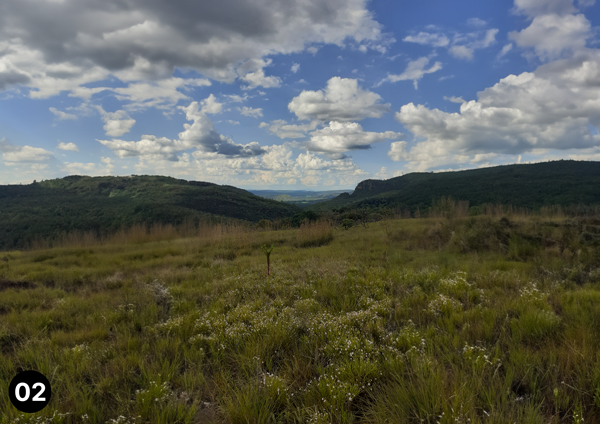
Another possibility brought by Generative Fill is extending an image with parts that didn’t exist before. This one is really interesting especially when you have a really good photo, but wish it had a better framing or needed it to be wider, for example.
If you’re thinking about workflow, it’s hard not to feel a little spoiled by this tech. There used to be a real “that’s all you get” vibe with off-centered photos or group shots where someone’s always half out of frame. Now, with Generative Fill adding parts of an image that never existed, you can fudge reality and fix problems with the click of a button (and a raised eyebrow). It does feel a little like cheating, but let’s face it, it opens up possibilities for creative recovery that just didn’t exist before. It’s not perfect—sometimes you get a weird shadow or a comically misplaced thumb—but overall, the convenience is wild.
Below we can see this resource in action: 01 is the original image taken with the cellphone camera and 02 is the landscape image generated with the help of Generative Fill. 03 shows exactly where the points of expansion are.


Let’s do one more test so we don’t drag this article out too much. I took an illustration with a unique style. So, I’ve put the illustration on a blank canvas and asked the AI to create a woman doing a presentation with graphics to an audience. And it gave me the following variations:

The tool still has a bad time replicating an illustration style with good results. Some of the variations may serve as a reference starting point, but it’s not yet the time to generate the best results with just one click. But, the future of Firefly promises interesting things, like combining images, taking a 3D modeling asset and creating any texture you want on it ,and generating vector images from prompts.
What I realized with these tests is that, at the current point, Generative Fill made photo editing and manipulation much easier and faster. Removing a background, inserting, removing or replacing elements in a picture with good results were tasks that used to take a long time, sometimes hours.
They can now be completed in a few seconds if you know how to ask, and don’t demand too much from the tool. A worthy reminder is that this tool and all other AI solutions are in constant improvement. So, the bad results of today will have been only “growing pains” tomorrow (maybe literally tomorrow).
A hypothesis for the bad results is that a learning database based only on Adobe Stock and expired copyrights image is way smaller than a general one. But if that’s the case. I would still prefer doing things the right way and respect copyrighted images.
Anyway, at this moment the evaluation of the creative community will help to improve Generative Fill. It’s possible to give positive or negative feedback to each generated image inside Photoshop Beta.
Meanwhile, I’ll begin to use some of the resources that can really save a lot of time and give my human touch to maintain quality standards. It was an average “first date”. With some mismatches, but some good surprises also.
Of course I’ll have to “go out” with those AI tools more times to see where this “relationship” can go. For now it’s safe to say that Adobe brought some game-changing possibilities to the table. Let’s experiment and watch closely to see what comes next.